
EIC France 2026 ePIC Tutorial Introduction
Last updated on 2026-11-06 | Edit this page
Overview
Questions
- What will we be doing in this tutorial?
- What is eic-shell?
- What is in the EIC software stack?
Objectives
- Explore the EIC software stack
Introduction
In this tutorial we will explore some key components and use cases of the ePIC software stack. We will take the files generated in the previous tutorial and process them through the simulation of the ePIC detector. We will then reconstruct the output of the simulation. Finally, we will then analyse the output of this reconstruction and try to identify events of interest.
This is analogous to a real experiment:
- Real experiment
- Collisions \(\rightarrow\) Raw signals in detector \(\rightarrow\) Reconstruct raw signals \(\rightarrow\) Analyse reconstructed output
- Simulation
- Generate events of interest \(\rightarrow\) Raw energy depositions in simulation \(\rightarrow\) Reconstruct raw signals \(\rightarrow\) Analyse reconstructed output
This analogy is intentional. We’re a little way away from “real” ePIC data, so simulations are all we have from now. However, we don’t want to develop a framework that’s only useful for simulations! We should analyse our simulations in the same way that we intend to organise and analyse real data. This should smooth the transition to actual running and ensure that we have people (you!) trained on how to analyse and interpret experimental data from day one.
Introduction - eic-shell
eic-shell is the environment in which we will be running
our simulation and reconstruction. This container comes with a range of
pre-compiled software. The versions of software installed in a given
container version are known and maintained. This is for reproducibility
purposes. If you run a simulation in eic-shell and see an issue, you can
quote the version of the container you’re using when reporting the
issue. This helps narrow down issues rapidly.
When you run
you should load into the container. If you have loaded the container
successfully you should see jug_dev> $User@$Host in your
terminal.
Within eic-shell, you can use the command
to check the versions of lots of software. This will provide a large
info dump, you can narrow it down via grep commands. For
example, you can check your container versions via:
to get the specific container image you’re using.
Introduction - The ePIC Software Stack
In simulating and reconstructing EIC/ePIC data, a large range of different software packages are used. Where possible, applicable software from other HEP experiments is utilised. For example ACTS is used for tracking.
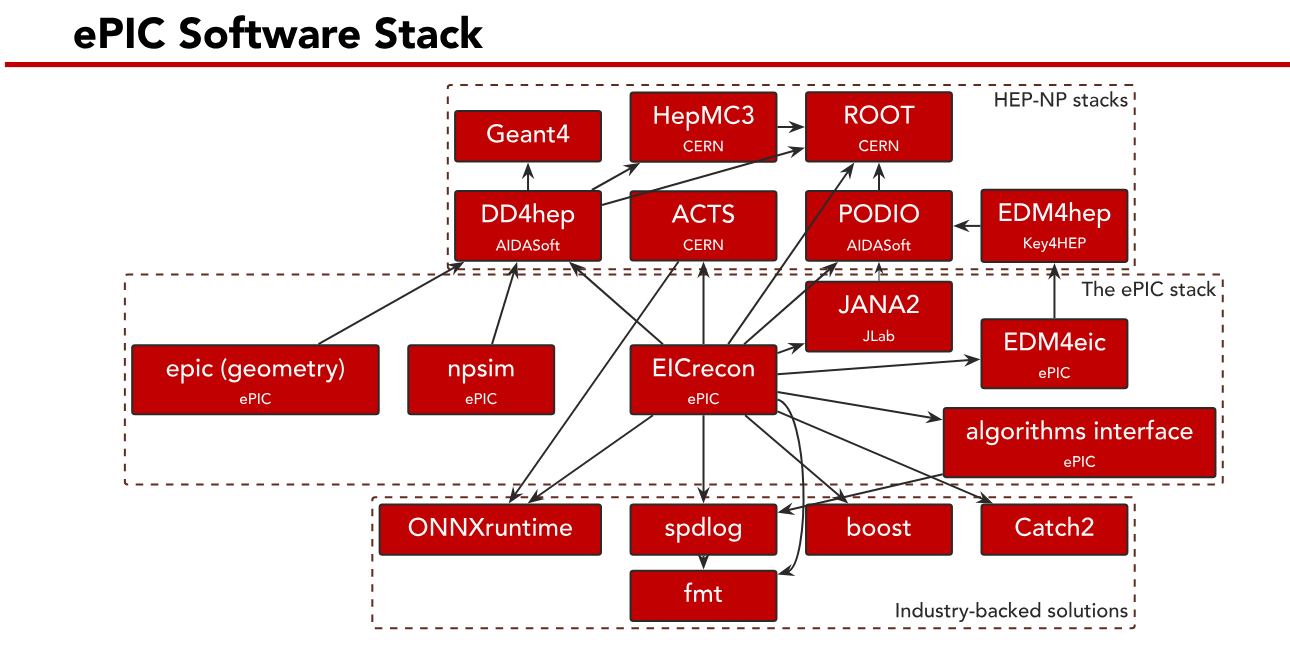
A clickable version is available on the eic.github.io page. Much of this software is pre-installed in eic-shell.
Challenge: Check a piece of the software stack
Within eic-shell, pick a piece of the ePIC software
stack from the diagram above and check what version is in use in the
container you’ve just loaded.
Switching Container Version
By default, when we load the container via CVFMS (or update it), we will get the latest nightly release. There are specific reasons you may wash to load a different container version though. To install a specific version, you can run:
when you execute your install command. As an example
26.07.0-stable is the July 2026 (version 0) container.
If you are running on a system with CVFMS (e.g. JLab or BNL farms), you can just run:
to switch to your desired container version.
- The ePIC software stack will be used to simulate and reconstruct our generated events
- The intention is that this stack is as comparable to the “final” experimental software as possible
-
eic-shellcontains pre-compiled versions of a whole host of software - Keep careful track of the container you’re using