
Tool servers and the Model Context Protocol (MCP)
Last updated on 2026-09-30 | Edit this page
Estimated time: 65 minutes
Overview
Questions
- What is MCP, and what problem does it solve?
- What can the EIC tool servers do?
- How do you connect an assistant to them?
Objectives
- Start the servers, check them, and read a server log when something
fails
(
eic-mcp up/status/logs). - Generate the connection file for your own client with
eic-mcp config. - Discover a real DIS dataset by prompting, without hard-coding names or paths.
- Judge which returned quantities are worth verifying, and against what.
One interface for tools
Tools are the only way an assistant can act (Episode 1). The Model Context Protocol (MCP) defines a standard interface for them: write a tool once as a server, and any client (assistant) that supports MCP can use it.
The lesson’s servers run inside eic-shell, and the assistant talks to them over a local web address.
%%{init: {'theme':'base', 'themeVariables': {'fontSize':'15px','lineColor':'#94a3b8','edgeLabelBackground':'#e2e8f0','clusterBkg':'#1f293720','clusterBorder':'#94a3b8','titleColor':'#94a3b8'}}}%%
flowchart LR
    accTitle: {EIC MCP data tools}
    accDescr: {EIC MCP data tools}
    A["AI assistant<br/>opencode · Copilot · Cursor"]:::core <-->|"MCP"| S["uproot tool server<br/>(MCP, in eic-shell)"]:::tool
    S <-->|"uproot"| F["EDM4eic ROOT file"]:::data
    classDef core fill:#e7efff,stroke:#4c6ef5,stroke-width:1.5px,color:#10204a;
    classDef tool fill:#e6f7ed,stroke:#2f9e44,stroke-width:1.5px,color:#0b3d1f;
    classDef data fill:#fff4e0,stroke:#f08c00,stroke-width:1.5px,color:#5c3b00;
The uproot tool server
The ePIC uproot tool server reads ROOT/EDM4eic files with uproot. It can list a file’s contents, compute statistics and histograms, and run short NumPy calculations over one file or a whole dataset. It returns small summaries (counts, bin edges, statistics) that you can check, not raw data. The calculations run in a sandbox that cannot install software or write files.
Start the servers
Start the servers inside eic-shell (see Setup):
This starts the uproot, xrootd, and rucio servers.
eic-mcp status shows which are running, and
eic-mcp logs uproot shows a server’s log.
If rucio answers but xrootd/uproot time out
If dataset queries work but file access hangs, the XRootD store may
be down; check with
xrdfs root://epicxrd1.sdcc.bnl.gov:1095 ls /eic/EPIC/RECO.
The default store (BNL) has campaigns from 25.12.0. For older ones
(up to 25.10.x) use JLab:
XROOTD_SERVER=root://dtn2304.jlab.org:8443 XROOTD_BASE_DIR=/jlab-osdf-ro/eic/EPIC/volatile eic-mcp restart.
If every uproot call times out after one large call, the server is
busy, not broken: it handles one request at a time. Wait, or run
EIC_MCP_SERVERS=uproot eic-mcp restart.
Connect the assistant
Write opencode’s config file in the directory where you start opencode, then start it:
In the session, /mcp lists the connected servers and
their tools.
Other clients use the same URLs: eic-mcp config claude
(or copilot, vscode, cursor,
gemini, codex) writes the file where that
client reads it.
Finding the data with MCP
You do not download a dataset. The other two MCP servers let the
assistant find and verify the files, in place of running
rucio and xrdfs by hand, and
uproot-mcp then reads them directly from the store.
%%{init: {'theme':'base', 'themeVariables': {'fontSize':'15px','lineColor':'#94a3b8','edgeLabelBackground':'#e2e8f0','clusterBkg':'#1f293720','clusterBorder':'#94a3b8','titleColor':'#94a3b8'}}}%%
flowchart LR
    accTitle: {EIC MCP data tools}
    accDescr: {EIC MCP data tools}
    R["rucio-mcp<br/>find the dataset"]:::tool -->|"file locations"| X["xrootd-mcp<br/>check the files"]:::tool
    X -->|"checked files"| U["uproot-mcp<br/>analyze in place"]:::core
    classDef tool fill:#e6f7ed,stroke:#2f9e44,stroke-width:1.5px,color:#0b3d1f;
classDef core fill:#e7efff,stroke:#4c6ef5,stroke-width:1.5px,color:#10204a;-
rucio-mcpsearches the data catalog: it finds a dataset by name, lists its files, and gives theirroot://locations. -
xrootd-mcpbrowses the data store and checks that the files exist.
uproot-mcp then reads a root:// file
in place.
List the available campaigns
ePIC data is organized by production campaign, a
version such as 26.06.0. The campaign, the beam/target, and
the physics process are all part of the rucio DID
(e.g. epic:/RECO/26.06.0/epic_craterlake/DIS/pythia8.316-1.0/NC/noRad/ep/18x275/...).
Before locating a specific dataset, check which campaigns exist so you
use a current one:
Using the rucio tools, find which production campaigns are available (the version field in the DIDs, e.g. 26.06.0) and show the most recent few.Watch how the assistant does this: the catalog holds thousands of datasets in no particular order, so looking at only the first page of results can miss the newest campaigns.
Exercise: locate a dataset (≈ 10 min)
Ask your assistant:
Use the rucio tools to find the ePIC reconstructed-DIS dataset for the BeAGLE eCu ep 10x115 GeV sample in campaign 26.04.1, list its files, then use the xrootd tools to confirm those files exist on the store and report the total number of events.The assistant finds the dataset with rucio (374 files), gets their
root:// locations, and checks them with xrootd. rucio does
not store event counts, and reading all 374 files would take an hour, so
a good answer checks a few files (≈ 1,220 events each) and
extrapolates.
Inspect the dataset
You describe what you want in plain language and the assistant makes
the tool calls. Take one of the root:// URLs from the
previous exercise (written below as
root://epicxrd1.sdcc.bnl.gov:1095//…) and analyze it in
place.
Exercise: enumerate the schema (≈ 10 min)
Issue the request:
Using the uproot tools, report the structure of the events tree in root://epicxrd1.sdcc.bnl.gov:1095//<your-discovered-file>.root and list the members of the ReconstructedChargedParticles collection.The assistant reads the structure of the events tree and
reports something like:
OUTPUT
File:  root://epicxrd1.sdcc.bnl.gov:1095//…/<dataset-file>.root
Tree:  events   — branches grouped by collection

ReconstructedChargedParticles collection:
  ReconstructedChargedParticles.PDG          int32[]   PDG particle-ID code
  ReconstructedChargedParticles.momentum.x   float[]   p_x [GeV]
  ReconstructedChargedParticles.momentum.y   float[]   p_y [GeV]
  ReconstructedChargedParticles.momentum.z   float[]   p_z [GeV]
  … energy, charge, mass, type, referencePoint.*, covMatrix.*
The names are read from the file, not guessed, so the assistant cannot invent branch names.
Exercise: identify the species present (≈ 10 min)
Issue the request:
Histogram ReconstructedChargedParticles.PDG with one bin per integer code, so I can see the reconstructed particle species in the file.The assistant makes a histogram with one bin per PDG code. A reconstructed-DIS file gives, for example:
OUTPUT
   PDG  species   count
  -211   pi-      11447
   211   pi+       9885
    11   e-        4489
     0   unID      2971      <- tracks with no PID hypothesis
  -321   K-        1662
   321   K+        1588
   -11   e+         967
 -2212   pbar       693
  2212   p          684      <- protons are rare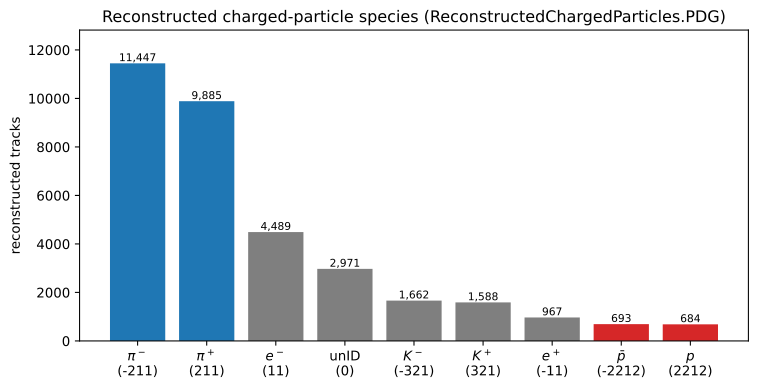
Pions dominate; protons are rare (≈ 2%), so the Λ⁰ signal will be small. A sizeable fraction of tracks have no PID (code 0) or a wrong one. This misidentification adds to the combinatorial background, which is why we fit the peak instead of counting it.
Verify the returned quantities
Look at the returned numbers (bin edges, counts, statistics). Do the PDG peaks fall at physical codes, and are the proton and pion yields plausible? Episode 4 turns this into explicit success criteria.
The same Λ⁰ peak can be obtained without MCP, with ROOT RDataFrame,
TTreeReader, plain uproot, or the PODIO Frame API; scripts are in extras/.
The assistant can now query the data through tools whose output you can check. The next episode writes this procedure down as a reusable, versioned skill.
- MCP servers give an assistant tools; any MCP assistant can use them.
-
eic-mcp upstarts the servers in eic-shell andeic-mcp config opencodeconnects opencode.